Table of Contents
- 1. Arrays, Linked Lists, and Binary Search Trees
- 2. BinaryNode structure - Wrapping the data and storing child pointers
- 3. BinarySearchTree structure
- 4. Binary Search Tree class functionality
- 5. Implementing a Binary Search Tree
1. Arrays, Linked Lists, and Binary Search Trees
If you're wanting to write a program that accesses data frequently but doesn't add new data all that much, the Array is probably a better design choice.
- With an Array's access, we have constant time complexity because to get
arr[i]the program takes the address ofarr[0]and addsi * sizeof(TYPE). Doing a math operation is constant, no matter how much data is in the array. This isO(1). - With a Linked List's access, we have linear time complexity. This is
because we only store pointers to the first (and maybe last)
Node in the List, and to get to any arbitrary index
iwe have to use a loop and moveptrCurrent = ptrCurrent->ptrNext;repeatedly until we get to the correct position. This isO(n).
However, if you're not doing a lot of accessing but you're doing a lot of adding new data, the Linked List is a better design choice.
- With an Array's add, if we're thinking in terms of the entire
lifetime of the array, we're going to be hitting
Resize()periodically when adding new items. The Resize function includes a for loop to copy all the elements from the old small array to the new big array, which gives us a general add time ofO(n). - With a Linked List's add, we have pointers to the front and the
back of the list. We allocate memory (constant) and we update the
old last's pointer, update the new node's pointer, and update
the list's pointer. (Or old first if it's PushFront.) Doing a
series of basic operations is generally
O(1).
HOWEVER, what if we're doing a decent amount of both adding and accessing? Instead, we could find a happy medium with a Binary Search Tree.
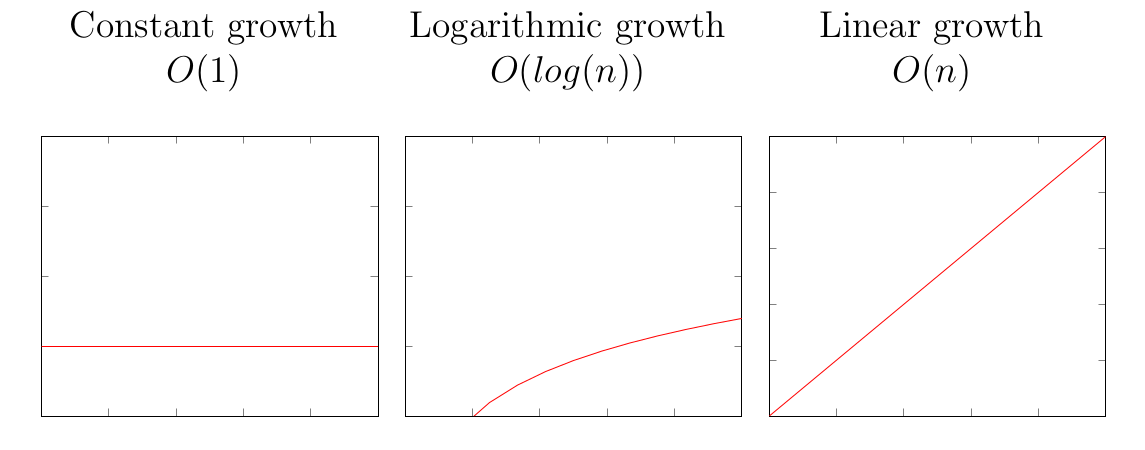
The Binary Search Tree ends up being a good compromise between choosing faster random access but slow search/insert/delete (like with a dynamic array) and faster inserts/deletes but slow search/access (like with a linked list).
The Binary Search Tree ends up being slower than \(O(1)\) (instant) but faster than \(O(n)\) (going through the entire list, where \(n\) is the number of nodes in the tree).
| Structure | Random access | Search | Insert | Delete |
|---|---|---|---|---|
| Dynamic array | \(O(1)\) | \(O(n)\) | \(O(n)\) | \(O(n)\) |
| Linked list | \(O(n)\) | \(O(n)\) | \(O(1)\) | \(O(1)\) |
| Binary search tree | \(O(log(n))\) | \(O(log(n))\) | \(O(log(n))\) | \(O(log(n))\) |
Why is this? By the nature of its tree structure, as we traverse the tree we're essentially cutting out half the tree each time we choose to go left or right. Halfing the nodes to search each cycle means we have the opposite of exponential growth: A logarithmic function.
Review 1. A hash table uses a…
- ○ comparing keys between nodes
- ○ math function
- ○ random index generator
… to find a location for the data.
A binary search tree…
- ○ comparing keys between nodes
- ○ math function
- ○ random index generator
… to find a location for the data.
2. BinaryNode structure - Wrapping the data and storing child pointers
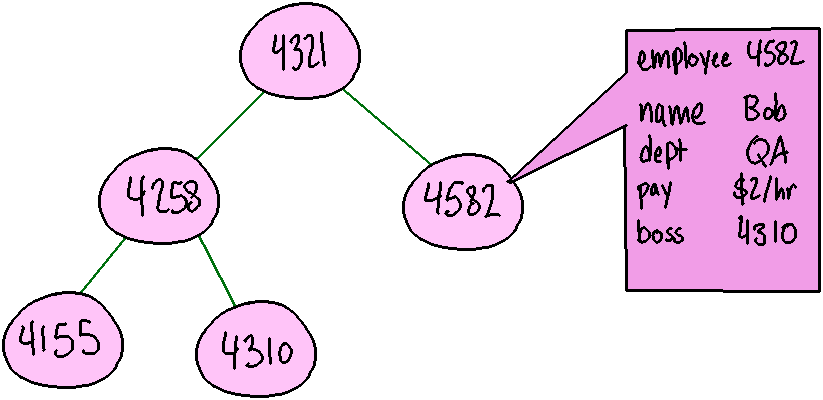
Figure 1: A binary tree for employees. There are several nodes. A node with the unique-identifier key "4582" is expanded to show its data - an instance of an Employee class, containing additional information like name, department, pay, and boss.
With a Doubly Linked List, our Node stored the data itself, as well as pointers to the previous and next items in the list.
| DoublyLinkedNode<TYPE> | |
|---|---|
- data |
: TYPE |
- ptrPrev |
Node<TYPE>* |
- ptrNext |
Node<TYPE>* |
For a Binary Search Tree, we also have a special Node, but instead of previous and next pointers, we instead store the Node's left and right child.
| BinaryTreeNode<TK, TD> | |
|---|---|
- key |
: TK |
- data |
: TD |
- ptrLeft |
Node<TK, TD>* |
- ptrRight |
Node<TK, TD>* |
We will also be storing the Node's key (a unique identifier) in addition to its data. The key is what helps us keep the Binary Search Tree organized, allowing us to intelligently traverse it: Smaller Node keys are on the left, larger Node keys are on the right.
The unique identifier key would be something simple like a student ID or some other sortable data - an int, for example - while the data would be a class object, storing much more data.
Review 2. Which Nodes store which pointers?
- Doubly Linked List Node: □ previous □ left □ next □ right
- Binary Search Tree Node: □ previous □ left □ next □ right
3. BinarySearchTree structure
A DoublyLinkedList structure stores pointers to its first and last Nodes in the list, and provides functionality for Push, Pop, and Get functionality, which allows modification at the Front or Back (at minimum).
| DoublyLinkedList | |
|---|---|
- ptrFirst |
: DLNode<TYPE>* |
- ptrLast |
: DLNode<TYPE>* |
- itemCount |
: unsigned int |
+ PushFront( newData: TYPE ) |
: void |
+ PopFront() |
: void |
+ GetFront() |
: TYPE& |
+ PushBack( newData: TYPE ) |
: void |
+ PopBack() |
: void |
+ GetBack() |
: TYPE& |
+ PushAt( newData: TYPE, index: unsigned int ) |
: void |
+ PopAt( index: unsigned int ) |
: void |
+ GetAt( index: unsigned int ) |
: TYPE& |
| (… etc …) |
With a BinarySearchTree, we only store a pointer to the root Node, and there is only one Push, Pop, and Get function since we're working with unique identifier keys.
| BinarySearchTree | |
|---|---|
- ptrRoot |
: BSTNode<TK, TD>* |
- nodeCount |
: size_t |
| + Push( newKey: TK, newData: TD ) | : void |
| + Pop( key: TK ) | : void |
| + GetData( key: TK ) | : TD |
| (…etc…) |
Review 3. What Node pointers are stored by each of the following data structures?
| Pointer to | Pointer to | Pointer to | |
|---|---|---|---|
| first node | last node | root node | |
| Linked List | □ | □ | □ |
| Binary Search Tree | □ | □ | □ |
4. Binary Search Tree class functionality
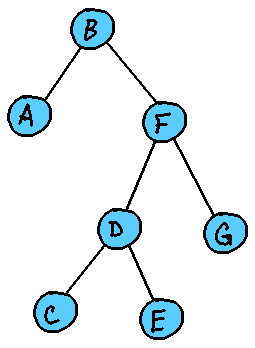
Figure 2: A binary search tree. Root node is "B". B's left child is A. B's right child is F. F's left child is D. F's right child is G. D's left child is C. D's right child is E.
4.1. Pushing a new <key, value> pair
The Binary Search Tree we are only going to keep a pointer to the root node of the tree, and we will traverse down left or right based on each Node's key value.
4.1.1. Adding to an empty tree
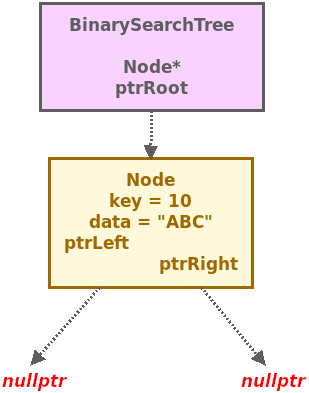
An empty BST will start with ptrRoot pointing to nullptr.
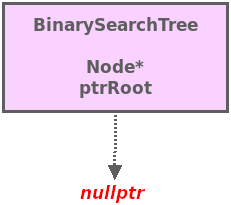
Our first node becomes the root of our tree:
4.1.2. Adding to a non-empty tree
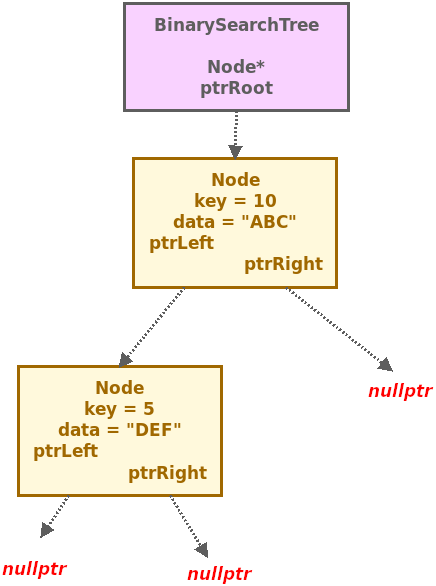
And as we gain more nodes, we find a place for it by starting at the root and, for each node, deciding whether to go left (new node key is smaller) or right (new node key is larger) until we find an available space.
4.2. Getting data
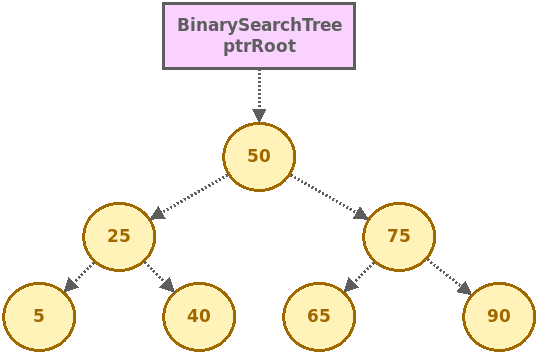
Once we have a set of Nodes in our tree, we can use the Get function to search for a node based on its key. Once found, it will return the associated data.
If the structure is empty (i.e., the
ptrRoot is set to nullptr), then an exception should be thrown.
If we traverse the tree recursively but end up running into a
nullptr Node pointer instead of the Node with the key, we can say
that there is no Node in the tree that has the requested key.
Review 4. Given this Binary Search Tree:
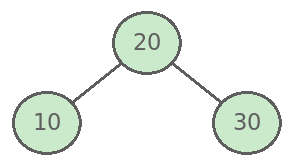
Figure 3: A binary search tree with 20 as the root, 20 has a left child 10, and 20 has a right child 30.
Review 5. Given this Binary Search Tree:
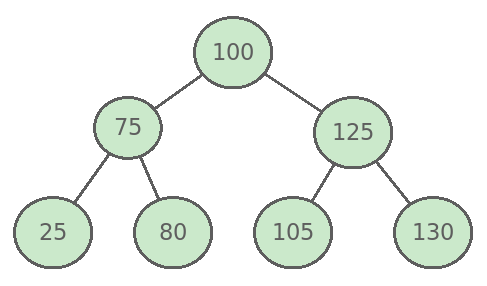
Figure 4: A binary search tree with 100 as its root. 100's left child is 75. 100's right child is 125. 75's left child is 25. 75's right child is 80. 125's left child is 105. 125's right child is 130.
- a. If we called Get and passed in a key of 80, what path would be traversed from the root to the returned node? (i.e., left/right at each step).
- b. If we called Get and passed in a key of 130, what path would be traversed from the root to the returned node? (i.e., left/right at each step).
- c. If we called Get and passed in a key of 102, which is not in the tree, what path would be traversed from the root until finally an exception is thrown?
5. Implementing a Binary Search Tree
Work in progress
BinarySearchTreeNode in C++:
template <typename TK, typename TD>
class Node
{
public:
  Node()
  {
    ptrLeft = nullptr;
    ptrRight = nullptr;
  }

  Node( TK newKey, TD newData )
  {
    key = newKey;
    data = newData;
    ptrLeft = nullptr;
    ptrRight = nullptr;
  }

  ~Node()
  {
    if ( ptrLeft != nullptr  ) { delete ptrLeft; }
    if ( ptrRight != nullptr ) { delete ptrRight; }
  }

  Node<TK, TD>* ptrLeft;
  Node<TK, TD>* ptrRight;

  TD data;
  TK key;
};
The node I've written here contains a key, which nodes will be ordered by, and data, which can contain more information.
As with any structure utilizing pointers, the pointers should be initialized
to nullptr in any constructors.
The destructor here will trigger the deletion of any child nodes, creating a chain reaction to clean up the entire tree if the root node is deleted.
BinarySearchTree in C++:
template <typename TK, typename TD>
class BinarySearchTree
{
public:
    BinarySearchTree();
    ~BinarySearchTree();

    // Basic functionality
    void Push( const TK& newKey, const TD& newData );
    bool Contains( const TK& key );
    TD& GetData( const TK& key );
    void Delete( const TK& key );

    // Traversal functions
    string GetInOrder();
    string GetPreOrder();
    string GetPostOrder();

    // Additional functionality
    TK& GetMinKey();
    TK& GetMaxKey();
    int GetCount();
    int GetHeight();

private:
    // (more here)

private:
    Node<TK, TD>* m_ptrRoot;
    int m_nodeCount;
};
A Binary Search Tree, just like other data structures, can store more functionality than this, or less if needed.
There are additional private methods that would be implemented. This declaration is just showing the public (interface) methods and the private member variables. I will talk about the private helper methods in depth later.
5.1. The Binary Search Tree and Recursion
Many of the BinarySearchTree functions will be recursive, starting at the root node and recursing down. Because of this, the Push function (and many others) that would actually do the work would look like this:
void RecursivePush(
  TK newKey,
  TD newData,
  Node<TK, TD>* ptrCurrent );
However, we don't want the user outside of the BinarySearchTree to have to
call Push and pass in the tree's node. They shouldn't even have access to
any Node objects…
myTree.Push( 'a', "apple", ???? ); // What do I pass in?
That's why we have the public Push function…
void Push( TK newKey, TD newData );
And a private RecursivePush function…
void RecursivePush( TK newKey, TD newData, Node<TK, TD>* ptrCurrent );
Where the user calls the public Push and that function makes the first call to RecursivePush, passing in the root node to begin operations on.
void Push( TK newKey, TD newData )
{
  RecursivePush( newKey, newData, m_ptrRoot );
}
5.2. Functionality of a Binary Search Tree
5.2.1. The Constructor:
emplate <typename TK, typename TD>
BinarySearchTree<TK,TD>::BinarySearchTree()
{
  m_ptrRoot = nullptr;
  m_nodeCount = 0;
}
The constructor of the BinarySearchTree should set the m_ptrRoot pointer to
nullptr and initialize the m_nodeCount to 0.
5.2.2. The Destructor:
template <typename TK, typename TD>
BinarySearchTree<TK,TD>::~BinarySearchTree()
{
  if ( m_ptrRoot != nullptr )
  {
    delete m_ptrRoot;
  }
}
The destructor of the BinarySearchTree will check to see if m_ptrRoot is not
null - if it's not null, we will free that memory with the delete command.
Since our BinarySearchTreeNode destructor deletes its left and right children,
we don't have to do anything special to clear out the whole tree - that will
happen automatically.
5.2.3. Push:
template <typename TK, typename TD>
void BinarySearchTree<TK,TD>::Push( const TK& newKey, const TD& newData )
{
  if ( Contains( newKey ) )
  {
    throw runtime_error( "Key is not unique!" );
  }
  else
  {
    RecursivePush( newKey, newData, m_ptrRoot );
  }
}
Remember that the Push function is just a public-facing starting point that
will begin the recursive process by calling the RecursivePush function,
starting at the root node.
First, before starting the recursion, use the Contains method to see if the
tree already contains the =newKey passed in.
If this key is already in the tree, we'll have to decide how to handle that.
In our example, we will just throw a runtime_error exception, because for
this design we're assuming that each key is a unique identifier.
If the key is not already in the tree, then we are going to call the
RecursivePush function to get started. RecursivePush takes in the key,
data, and a node, so we pass on the newKey and newData parameters and we
start at m_ptrRoot.
If the root is already storing some data, then we call RecursivePush, passing
forward the newKey, newData, and the m_ptrRoot as the starting point.
RecursivePush:
Within the RecursivePush function, we are looking for a position to place our new node at. While we haven't found an appropriate position, we will continue recursing left or right to ensure our keys are sorted.
- Terminating cases:
- If
ptrCurrentis nullptr, then the node can be created here.
- If
ptrCurrent = new Node<TK,TD>(newKey, newData);
m_nodeCount++;
- If
newKeyis less thanptrCurrent's key, AND ifptrCurrentDOES NOT HAVE a left child, then we can create the new node to the left ofptrCurrent.
ptrCurrent->ptrLeft = new Node<TK,TD>(newKey, newData);
m_nodeCount++;
- If
newKeyis greater thanptrCurrent's key, AND ifptrCurrentDOES NOT HAVE a right child, then we can create the new node to the right ofptrCurrent.
ptrCurrent->ptrRight = new Node<TK,TD>(newKey, newData);
m_nodeCount++;
- Recursive cases:
- If the
newKeyis less thanptrCurrent's key, ANDptrCurrentHAS a left child, then we recurse to the left.
- If the
// Recurse left
RecursivePush(newKey, newData, ptrCurrent->ptrLeft);
- If the
newKeyis greater thanptrCurrent's key, ANDptrCurrentHAS a right child, then we recurse to the right.
// Recurse right
RecursivePush(newKey, newData, ptrCurrent->ptrRight);
5.2.4. Contains
template <typename TK, typename TD>
bool BinarySearchTree<TK,TD>::Contains( const TK& key )
{
  return RecursiveContains( key, m_ptrRoot );
}
The Contains method also is a public entry-point that will start the
RecursiveContains method at the m_ptrRoot.
RecursiveContains:
RecursiveContains will look at the current node ptrCurrent. If the
ptrCurrent's key matches the key we're searching for, then we'll return
true. Otherwise, we will recurse left or right searching for the key. If
we run out of nodes to search, then the key is not found and we return false.
- Terminating cases:
- If
ptrCurrentis nullptr, then we've run out of nodes to search - return false. - If
ptrCurrent's key matches thekeyparameter, then we've found the key we're looking for - return true.
- If
- Recursive cases:
- If
keyis less thanptrCurrent's key, then recurse left.
- If
return RecursiveContains(key, ptrCurrent->ptrLeft);
- If
keyis greater thanptrCurrent's key, then recurse right.
return RecursiveContains(key, ptrCurrent->ptrRight);
5.2.5. GetData
template <typename TK, typename TD>
TD& BinarySearchTree<TK,TD>::GetData( const TK& key )
{
  Node<TK, TD>* node = FindNode( key );
  if ( node == nullptr ) { throw runtime_error( "Key not found!" ); }
  return &(node->data);
}
The GetData function takes in a key and returns the data for the given node.
If that node does not exist in the tree, then an exception will be thrown.
5.2.6. FindNode
template <typename TK, typename TD>
Node<TK, TD>* BinarySearchTree<TK,TD>::FindNode( const TK& key )
{
  return RecursiveFindNode( key, m_ptrRoot );
}
The FindNode function is the starting point that will begin the
RecursiveFindNode at the m_ptrRoot.
RecursiveFindNode:
RecursiveFindNode will search the tree for the key given, stopping only
once found or once there are no more nodes to search.
- Terminating cases:
- If
ptrCurrentis nullptr, then we've run out of nodes to search - returnnullptr. - If
ptrCurrent's key matches thekeyparameter, then we've found the key we're looking for - return theptrCurrent.
- If
- Recursive cases:
- If
keyis less thanptrCurrent's key, then recurse left.
- If
return RecursiveFindNode(key, ptrCurrent->ptrLeft);
- If
keyis greater thanptrCurrent's key, then recurse right.
return RecursiveFindNode(key, ptrCurrent->ptrRight);
5.2.7. GetMinKey
template <typename TK, typename TD>
TK& BinarySearchTree<TK,TD>::GetMinKey()
{
  return RecursiveGetMin( m_ptrRoot );
}
The GetMinKey function starts the recursive search for the minimum key,
starting at m_ptrRoot.
RecursiveGetMin:
- Terminating cases:
- If
ptrCurrentis nullptr, throw aruntime_error. - If
ptrCurrenthas no left children, then we're at the min node. ReturnptrCurrent's key.
- If
- Recursive cases:
- Recurse to the left.
return RecursiveGetMin(ptrCurrent->ptrLeft);
5.2.8. GetMaxKey
template <typename TK, typename TD>
TK& BinarySearchTree<TK,TD>::GetMaxKey()
{
  return RecursiveGetMax( m_ptrRoot );
}
The GetMaxKey function starts the recursive search for the maximum key,
starting at m_ptrRoot.
RecursiveGetMax:
- Terminating cases:
- If
ptrCurrentis nullptr, throw aruntime_error. - If
ptrCurrenthas no right children, then we're at the max node. ReturnptrCurrent's key.
- If
- Recursive cases:
- Recurse to the right.
return RecursiveGetMax(ptrCurrent->ptrRight);
5.2.9. GetHeight
template <typename TK, typename TD>
int BinarySearchTree<TK,TD>::GetHeight()
{
  if ( m_ptrRoot == nullptr ) { return 0; }
  return RecursiveGetHeight( m_ptrRoot );
}
The GetHeight function starts recursively analyzing the heights of each
left-subtree vs. each right-subtree in order to find the maximum height of
the tree.
RecursiveGetHeight:
Execute the commands in the following order:
- If
ptrCurrentis nullptr, return 0. - Create two integer variables,
leftHeightandrightHeight, and initialize them to 0. - If
ptrCurrenthas a left child, then recurse to the left. Store the result inleftHeight, and add +1.
leftHeight = RecursiveGetHeight(ptrCurrent->ptrLeft)+1;
- If
ptrCurrenthas a right child, then recurse to the right. Store the result inrightHeight, and add +1.
rightHeight = RecursiveGetHeight(ptrCurrent->ptrRight)+1;
- If
leftHeightis greater thanrightHeight, then return theleftHeight. - Otherwise, return the
rightHeight.
5.2.10. GetInOrder
template <typename TK, typename TD>
string BinarySearchTree<TK,TD>::GetInOrder()
{
  stringstream stream;
  RecursiveGetInOrder( m_ptrRoot, stream );
  return stream.str();
}
The GetInOrder function starts recursively building a stream of nodes of the
tree, ordered in-order.
RecursiveGetInOrder:
- Terminating case:
- If
ptrCurrentis nullptr, just return.
- If
- Recursive cases:
- Recurse to the left child.
RecursiveGetInOrder(ptrCurrent->ptrLeft, stream);
- Add the
ptrCurrent's key to the stream.
stream << ptrCurrent->key;
- Recurse to the right child.
RecursiveGetInOrder(ptrCurrent->ptrRight, stream);
5.2.11. GetPreOrder
template <typename TK, typename TD>
string BinarySearchTree<TK,TD>::GetPreOrder()
{
  stringstream stream;
  RecursiveGetPreOrder( m_ptrRoot, stream );
  return stream.str();
}
The GetPreOrder function starts recursively building a stream of nodes of the
tree, ordered pre-order.
RecursiveGetPreOrder:
- Terminating case:
- If
ptrCurrentis nullptr, just return.
- If
- Recursive cases:
- Add the
ptrCurrent's key to the stream.
- Add the
stream << ptrCurrent->key;
- Recurse to the left child.
RecursiveGetPreOrder(ptrCurrent->ptrLeft, stream);
- Recurse to the right child.
RecursiveGetPreOrder(ptrCurrent->ptrRight, stream);
5.2.12. GetPostOrder
template <typename TK, typename TD>
string BinarySearchTree<TK,TD>::GetPostOrder()
{
  stringstream stream;
  RecursiveGetPostOrder( m_ptrRoot, stream );
  return stream.str();
}
The GetPostOrder function starts recursively building a stream of nodes of the
tree, ordered post-order.
RecursiveGetPostOrder:
- Terminating case:
- If
ptrCurrentis nullptr, just return.
- If
- Recursive cases:
- Recurse to the left child.
RecursiveGetPostOrder(ptrCurrent->ptrLeft, stream);
- Recurse to the right child.
RecursiveGetPostOrder(ptrCurrent->ptrRight, stream);
- Add the
ptrCurrent's key to the stream.
stream << ptrCurrent->key;