Table of Contents

1. Writing robust software
As a software developer, you will often be writing software that other developers will be using. This could be other developers at the company working on the same software product, or perhaps you might write a library that gets licensed out to other companies, or anything else. Your code will need to have checks in place for errors and be able to manage those errors gracefully, allowing the software to continue running instead of letting the program crash and restart.
A long time ago, lots of developers used numeric error codes to
track errors. If you've ever seen something like "Error 12943"
with no other useful information, that is an example of these error
codes - useless for the end-user, but meant so that the programmer
can search the code for that number and find where it broke. This is
also why we use return 0 at the end of our C++ programs -
technically, you could return anything else, but returning 0 is meant
to show that there were no errors. If you ran into an error, you could
return 1 or 2 or 3 instead to mark errors.
Modern languages have exception handling built in, usually working with a try/catch style. You write in logic to check for errors, and when you find a problem you throw an exception, and that exception can be caught elseware in the code.
What kind of errors can we listen for?
- Trying to open a file that doesn't exist
- Memory access violations
- Invalid math (dividing by 0)
- Not enough memory
- Receiving unexpected inputs
- Trying to delete from an empty data structure
- Problem converting one data type to another
2. The C++ Exception object
C++ has an exception family of objects that we can use
when trying to classify what kind of exception has happened.
If none of the existing exception objects is appropriate, you can
also create your own exception type.
Exceptions: (From http://www.cplusplus.com/reference/exception/exception/)
| Exception class | Description |
|---|---|
bad_alloc |
Exception thrown on failure allocating memory |
bad_cast |
Exception thrown on failure to dynamic cast |
bad_exception |
Exception thrown by unexpected handler |
bad_function_call |
Exception thrown on bad call |
bad_typeid |
Exception thrown on typeid of null pointer |
bad_weak_ptr |
Bad weak pointer |
ios_base::failure |
Base class for stream exceptions |
logic_error |
Logic error exception |
runtime_error |
Runtime error exception |
domain_error |
Domain error exception |
future_error |
Future error exception |
invalid_argument |
Invalid argument exception |
length_error |
Length error exception |
out_of_range |
Out-of-range exception |
overflow_error |
Overflow error exception |
range_error |
Range error exception |
system_error |
System error exception |
underflow_error |
Underflow error exception |
bad_array_new_length |
Exception on bad array length |
3. Detecting errors and throwing exceptions
The first step of dealing with exceptions is identifying a place where an error may occur - such as a place where we might end up dividing by zero. We write an if statement to check for the error case, and then throw an exception. We choose an exception type and we can also pass an error message as a string.
Example: "Risky" function detecting a divide by 0 error
int ShareCookies( int cookies, int kids )
{
  if ( kids == 0 )
  {
    throw runtime_error( "Cannot divide by zero!" );
  }

  return cookies / kids;
}
3.1. Listening for exceptions with try
Now we know that the function ShareCookies could possibly
throw an exception. Any time we call that function, we need to
listen for any thrown exceptions by using try.
Example: Calling the "Risky" function (e.g., from main)
try
{
  // Calling the function
  cookiesPerKid = ShareCookies( c, k );
}
3.2. Dealing with exceptions with catch
Immediately following the try, we can write one or more catch blocks for different types of exceptions and then decide how we want to handle it.
Example: Calling the "Risky" function, catching an exception and handling it
try
{
  // Calling the function
  cookiesPerKid = ShareCookies( c, k );
}
catch( runtime_error ex )
{
  // Display the error message
  cout << "Error: " << ex.what() << endl;

  // Handling it by setting a default value
  cookiesPerKid = 0;
}

cout << "The kids get " << cookiesPerKid << " each" << endl;
A function could possibly throw different types of exceptions for different errors, and you can have multiple catch blocks for each type.
Handling the error: Once you catch an error, it's up to you to decide what to do with it. For example, you could…
- Ignore the error and just keep going
- Write some different logic for a "plan B" backup
- End the program because now the data is invalid
Coding with others' code: While writing software and utilizing others' code, you will want to pay attention to which functions you're calling that could throw exceptions. Often code libraries will contain documentation that specify possible exceptions thrown.
4. Common error in student implementations
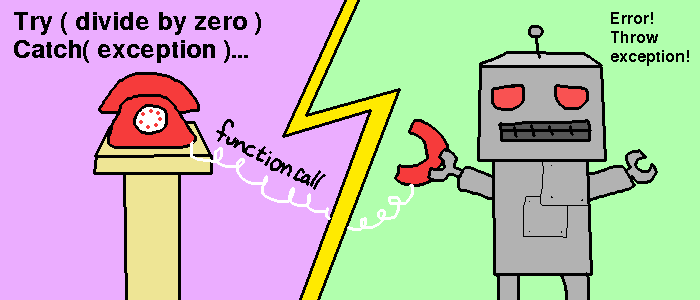
A common error I see students make is to put the try, catch, and throw statements all in one function. This defeats the point of even using exceptions.
Common error: DON'T DO THIS!
float Divide( float num, float denom )
{
  try
  {
    if ( denom == 0 )
    {
      throw Exception;
    }

    return num / denom;
  }
  catch( Exception& ex )
  {
    // ...
  }
}
Remember that the throw belongs within a function that could cause an error, and the try/catch belongs with the location that calls the potentially exception-causing function.
Example Program
// FUNCTION THAT COULD CAUSE ERROR - Responsible for THROW
float Divide( float num, float denom )
{
  if ( denom == 0 ) {
    throw invalid_argument( "Can't divide by 0!" );
  }

  return num / denom;
}


int main()
{
  float n, d;
  cout << "Enter num: ";
  cin >> n;

  cout << "Enter denom: ";
  cin >> d;

  float result = 0;
  try // CALLING "IFFY" FUNCTION - Wrap the CALL in try/catch
  {
    result = Divide( n, d );
  }
  catch( Exception& ex )
  {
    cout << "ERROR OCCURRED!" << endl;
    return 1234;
  }

  cout << "Result: " << result << endl;

  return 0;
}