Table of Contents
Overview:
- Terms to know: Inheritance, composition, protected accessibility, function overriding
- Concepts:
- How to have one class inherit from another.
- How to have one class compose another.
1. Reusing functionality
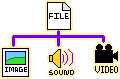
Inheritance is where one class inherits some or all member variables and functions from some parent class. Certain "traits" are passed on, and the child class can have additional member variables and functions defined, making it a more specialized version of the parent class.
Let's say we're designing an operating system that will store files. We can think about what all files have in common, and we can figure out what is different between different types of files. Any commonality could go in a base class (aka parent class).
So, a generic File class might have contain variables and functions like:
| File | |
|---|---|
- m_filename |
: string |
- m_extension |
: string |
- m_fileSize |
: size_t |
- m_creationDate |
: DateTime |
+ CreateFile(...) |
: void |
+ RenameFile(...) |
: void |
+ GetSize() |
: size_t |
+ GetPath() |
: string |
Then we could have specialized file classes that inherit from the original File, such as TextFile, ImageFile, SoundFile, and so on. These would inherit all the common attributes of its parent (File), but each would have additional variables and methods that are suited specifically to its own specialization.
- TextFile:
m_textContent,Print() - ImageFile:
m_pixels[][],Draw(),EditPixel( x, y ) - SoundFile:
m_audioSample,m_length,Play(),Pause(),Stop()
Review 1. Member functions and variables that are shared between different classes should be created in the…
- ○ Child (sub) class
- ○ Function declaration
- ○ Parent (base) class
1.1. Example: The iostream and fstream family
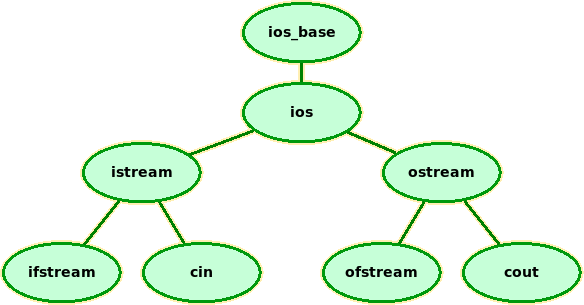
Part of the ios family. You can see the full library's family tree at http://www.cplusplus.com/reference/ios/
One family we've already been using are our console input/output
streams, cin and cout, and our file input/output streams,
ifstream and ofstream. Working with each of these works largely
the same way.
When we overload the << and >> stream operators, we use a base
type of istream and ostream so that our class can handle cin
/ cout AND ifstream / ofstream, as well as any other streams
in that family tree.
2. Inheritance (Is-A) vs. Composition (Has-A)
Another way we think about inheritance is that one class "is-a" type of other class.
Example: Car is-a vehicle:
class Car : public Vehicle
{
  // etc.
};
Whereas Composition, where one class contains another class as a member variable object, is known as a "has-a" relationship.
Example: Car has-an engine:
class Car
{
  private:
  Engine engine;
};
When is composition more appropriate than inheritance? This is a design question and it can really depend on how the designer feels about each one.
Review 2a. Composition means…
- ○ one class is a member variable of another class
- ○ one class IS another class, and then some
Review 2b. Inheritance means…
- ○ one class is a member variable of another class
- ○ one class IS another class, and then some
2.1. Example: Game objects
For example, when writing a game, I find inheritance handy for creating game objects. A BaseObject can contain everything that's in common between all objects (characters, items, tiles, etc.), such as:
2.1.1. BaseObject
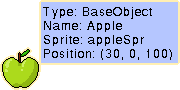
Any items that don't animate, don't move, and just sit there in the level could be instantiated as a simple BaseObject and it would be fine.
| BaseObject | |
|---|---|
# m_position |
: Coordinate |
# m_sprite |
: Sprite |
# m_name |
: string |
+ Setup(...) |
|
+ SetTexture(...) |
|
+ Update(...) |
|
+ SetPosition(...) |
|
+ Draw(...) |
Then, let's say we want to build a 2D game level and each level is made up of a 2D array of tiles. Tiles will be very similar to objects, but maybe we want more information stored in a tile. We could then inherit from the BaseObject…
2.1.2. Tile
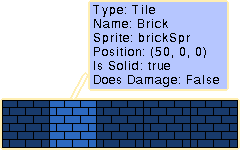
The Tile class would have all the public and protected members from its parent, plus any new member variables and methods we declare within this class.
| Tile | Inherits from BaseObject |
|---|---|
- m_isSolid |
: bool |
- m_doesDamage |
: bool |
2.1.3. Character
For the game characters, there would be two different types usually: characters that the players control and characters that the computer controls. Character could be its own base-class as well, implementing anything a character can do, with a Player and NPC (non-player-character) classes inheriting from Character.
| Character | Inherits from BaseObject |
|---|---|
# m_speed |
: int |
# m_direction |
: Direction |
# m_animFrame |
: float |
# m_maxFrames |
: float |
+ Move(...) |
|
+ Animate(...) |
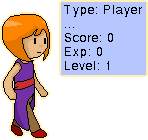
2.1.4. Player
| Player | Inherits from Character |
|---|---|
- m_score |
: int |
- m_experience |
: int |
- m_level |
: int |
+ HandleKeyboard(...) |
|
+ LevelUp(...) |
The Player class would be a specialized type of Character that can be controlled via the keyboard (or some other input device), as well as have information that a non-player-character generally has, such as a score or a level.
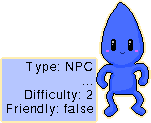
2.1.5. NonPlayerCharacter
| NPC | Inherits from Character |
|---|---|
- m_difficulty |
: int |
- m_isFriendly |
: bool |
+ SetGoal(...) |
|
+ DecideNextAction(...) |
Likewise, the NPC class is a specialization of Character as well, but with special functionality and attributes of a character in the game controlled by the computer itself. This could include some form of AI to help the NPC decide how to behave.
Game object family:
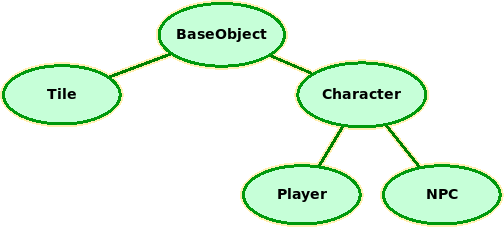
With this family of game objects, we could also write functions that work on all types of game objects, such as checking if there's a collision between items, because they all have a common parent.

3. Implementing inheritance
In C++ a class can inherit from one or more other classes. Note that Java and C# do not support multiple inheritance directly, if you end up switching to those languages. Design-wise, however, it can be messy to inherit from more than one parent and as an alternative, you might find a composition (has-a) approach a better design.
3.1. Inheriting from one parent
To inherit from one other class in C++, all you need to do is add
": public OTHERCLASS" after the "class CLASSNAME" at the
beginning of your class declaration. With a public inheritance
(the most common kind), the child class will inherit all public and
protected members of the parent class.
// File is the parent
class File
{
protected:
  string name;
  string extension;
  size_t filesize;
};

// TextDocument is the child
class TextDocument : public File
{
protected:
  string textContents;
  /* Also inherits these members from File:
     string name;
     string extension;
     size_t filesize;
  */
};
Context: The Parent Class is often known as the superclass and the Child Class is often known as the subclass, particularly from the Java perspective.
3.2. Inheriting from multiple parents
You can also have a class inherit from multiple parents, bringing in public/protected members from all parent classes, but again this can muddle your program's design somewhat and is generally pretty uncommon.
class AnimationObject  // Parent A
{
public:
  void Animate();

protected:
  int totalFrames;
  int currentFrame;
};

class PhysicsObject  // Parent B
{
public:
  void Fall();
  void Accelerate();

protected:
  float velocity;
  float acceleration;
};

class PlayerCharacter : public AnimationObject,
                        public PhysicsObject
{
public:
  void HandleKeyboard();

protected:
  string name;
};
Review 3. A child class inherits its parents' (select all correct options):
- □ public
- □ private
- □ protected
… member … (select all correct options):
- □ variables
- □ functions
4. Accessibility - Private, Public, and Protected
class Child : public Parent // A public inheritance
{
};
Remember that we can declare our member variables and methods as private and public, but we can also make items protected. Protected members are similar to private, except that protected members will be inherited by child classes - private members do not get inherited.
| Access | Class' methods | Childrens' methods | Outside functions |
|---|---|---|---|
| public | Accessible | Accessible | Accessible |
| protected | Accessible | Accessible | Not accessible |
| private | Accessible | Not accessible | Not accessible |
Inheritance style
You can also use public, protected, and private when inheriting other classes. You probably won't need to ever do a protected or private inheritance.
- public inheritance: Child class inherits public and protected members from the parent.
- protected inheritance: Child class inherits public and protected members and turns them into protected members.
- private inheritance: class inherits public and protected members and turns them into private members.
This could be used if, for some reason, you want a child class to inherit certain members but don't want "grandchildren" to have access to those members as well.
Review 4. Just use public inheritance.
- ○ OK
- ○ NEVER!!!
5. Function overriding
When a child class inherits from a parent class, the parent class' public and protected methods are passed down to the child and these functions are still callable for objects of the child type. If we would like, the child class can also override any methods from the parent. This means that we write a new version of the function with the same return type and parameter list, and when that function is called from the child class, the child class' version will be called instead of the parents'.
Let's say we're writing a quizzer program that will support different question types. We can write a base "Question" class with whatever would be in common between all Questions:
class QuestionInterface
{
  public:
  Question( string newQuestion ) ;
  void DisplayQuestion();
  bool AskQuestion();

  protected:
  string question;
};
We can then inherit from our Question class to make different types
of quiz questions: Multiple choice, true/false, and so on. Adding
additional functionality means that we might want to rewrite how
AskQuestion() works - so we can.
This also means that everything in our Question family has a similar
interface – create a question, set it up, and then call
AskQuestion() no matter what kind of question it is.
class MultipleChoiceQuestion : public QuestionInterface
{
  public:
  MultipleChoiceQuestion( string newAnswers[4], int newCorrect );
  bool AskQuestion();
  // Also inherits DisplayQuestion from parent

  protected:
  string answerChoices[4];
  int correctIndex;
};
The MultipleChoiceQuestion has an array of answers to choose from,
but other question types might use different member variables -
a true/false question could store bool correctAnswer, a fill in
the blank question could store string correctAnswer, and so on.
Review 5. Overriding means…
- ○ Having two functions with the same name but different parameter lists.
- ○ Using the same function signature as the parents' and then defining a new version for the child class.
6. Calling the parents' version of a method
In some cases, perhaps the parent version of a method has some common functionality we will need no matter what version in the family we're using, but the child versions of the methods add on to that functionality. We can directly call the parent's version of some method from within a child's method by explicitly calling the method with the parent class name and the scope resolution operator ::.
class Lion
{
  public:
  void Activities()
  {
    cout << "Hunt" << endl;
    cout << "Eat" << endl;
    cout << "Sleep" << endl;
  }
};

class HouseCat : public Lion
{
  public:
  void Activities()
  {
    Lion::Activities(); // CALL PARENT VERSION
    cout << "Talk to human" << endl;
    cout << "Use catbox" << endl;
  }
};
For this example, the HouseCat does everything the Lion does and
adds a few activities to the list. We don't have to re-write the same
Activities from Lion - we can just call the parent's version of the
method directly with Lion::Activities();.
Review 6. To call the parents' version of a function we have to prefix the function name with…
- ○ The child's class name and the
->arrow operator. - ○ The parent's class name and the
.dot operator. - ○ The parent's class name and then
::scope resolution operator. - ○ It is impossible to call a parents' version of a function once you've overridden it.
7. Constructors and Destructors in the family
We often use constructors to initialize member variables for a class, and when a child is inheriting its parents' member variables, we want to make sure we're not forgetting to still initialize those variables.
We can call the parent's constructor from the child's constructor as well, but we do it via the initializer list of a constructor - a little bit of code after the constructor's function header that can be used to initialize variables and call the parent constructor.
class Person
{

  public:
  Person( string name )
  {
    m_name = name;
  }

  protected:
  string m_name;
};

class Student : public Person
{
  public:
  Student( string name, string major )
    : Person( name ) // Calling the parent's constructor
  {
    m_major = major;
  }

  protected:
  string m_major;
};
We can also initialize variables through the initializer list as well:
class Student : public Person
{
  public:
  Student( string name, string major )
    : Person( name ), m_major( major ) // Initializer
  {
    // nothing else to do now!
  }

  protected:
  string m_major;
};
Review 7. If you put : after the constructor's header, then you can…
- ○ Call other functions and initialize variables.
- ○ Cause the program to crash.
- ○ Set member variables of child classes.
- ○ Erase all private member variables.