Table of Contents
1. Function overloading
In C++, you can also write multiple functions that have the same name, but a different parameter list. This is known as function overloading.
Let's say you want to be able to sum numbers, and you make a version for floats and a version for integers:
An overloaded Sum function:
int Sum( int a, int b )
{
    return a + b;
}

float Sum( float a, float b )
{
    return a + b;
}
You can write as many versions of the function as you like, so long as the function headers are uniquely identifiable to the compiler, which means:
- The functions have a different amount of parameters, or
- The data types of the parameters are different, or
- The parameters are in a different order (when mixing data types).
The return type doesn't factor into the function's uniqueness, so make sure that you're changing up the parameter list.
Review 1. Which of the following affect the function signature's uniqueness? (Select all correct answers).
- □ Function name
- □ Parameter list
- □ Return type
Example overloaded functions - Config manager
Here we have a program that uses a ConfigManager class to deal
with saving and loading program settings to a file. While the
program runs, we probably want to be able to update settings, and
those settings will be stored as a key, value pair of some kind.
Some settings, like "screen_width", might be an integer, while
other settings, like "last_save_game" might be a string. Within
the ConfigManager, we provide two different functions to be able to
update either type of option:
~
ConfigManager with overloaded Set functions:
class ConfigManager
{
public:
  void Load( std::ifstream& input );
  void Save();

  std::string Get( const std::string& key );
  int GetInt( const std::string& key );
  void Set( const std::string& key, const std::string& value );
  void Set( const std::string& key, int value );

  // ... etc ...
};
To call the function, let's say we have a ConfigManager config;
variable declared and set up. We could call the Set function in
either of these ways:
Calling each of the two Set functions with different arguments:
config.Set( "screen_width", 800 );
config.Set( "last_save_game", "autosave.gam" );
Review 2. True or false: Function overloading can also be used for a class' member functions (aka methods).
○ True / ○ False
Example overloaded functions - MenuManager
Here is a MenuManager that stores things like UILabel objects
and other elements. These elements go on separate layers and each
element has a unit name.
The GetLabel function can be overloaded so that when we call it,
we don't necessarily need the layer name - that version of the
function does a search. Or, we can call the version and provide
the layer name, and the element can be accessed directly and much
more quickly.
MenuManager with overloaded GetLabel functions
class MenuManager
{

public:
  UILabel& GetLabel( const std::string& layer, const std::string& name );
  UILabel& GetLabel( const std::string& name );
  // ... etc ...

private:
  std::map< std::string, UILayer > m_layers;
  // ... etc ...
};
To call the function, let's say we have a MenuManager menuManager;
variable declared and set up. We could call the GetLabel function in
either of these ways:
~
Calling the GetLabel functions with different arguments
// Slow version
UILabel& currentLabel = menuManager.GetLabel( "filename" );

// Fast version
UILabel& currentLabel = menuManager.GetLabel( "file_info", "filename" );
Review 3. Given these two function declarations:
void Log( string text, int level );
void Log( string text );
And the following function call:
Log( "Error: Out of range!", 1 );
Which function gets called?
- ○
void Log( string text, int level ); - ○
void Log( string text );
2. Constructor overloading
Class constructors are special functions that are called automatically when a new object (of that class type) is instantiated. (In other words, when you declare a new variable and the data type is that class.)
There are three main types of constructors we can write, each of them overloaded.
2.1. Default constructor
The default constructor has no parameters and is called
automatically when we declare a class object variable like this:
MyClass variablename;
Default constructors are usually used to initialize an object to get it ready for usage. This can include:
- Setting any internal pointers to
nullptrfor safety. - Opening files for any member ifstream/ofstream variables to get ready to write to.
- Setting member variables to some default values.
~
MyClass.h with one constructor (default constructor):
class MyClass
{
  public:
  MyClass(); // default constructor

  private:
  int m_memberVariable;
};
~
MyClass.cpp, defining the default constructor:
MyClass::MyClass()
{
  m_memberVariable = 100;
}
2.2. Parameterized constructor
A parameterized constructor is when we have one or more parameter in the constructor's parameter list. These are values that will be passed into the object as it's being instantiated, and these values can be used to set values to the object's member variables immediately.
~
MyClass.h with default constructor and parameterized constructor:
class MyClass
{
  public:
  MyClass();                 // default ctor
  MyClass( int new_value );  // parameterized ctor

  private:
  int m_memberVariable;
};
~
MyClass.cpp, defining the parameterized constructor:
MyClass::MyClass( int new_value )
{
  m_memberVariable = new_value;
}
Then the object will be instantiated like this: MyClass variablename( 100 );
Example default & parameterized constructors - Logger
Similarly to the default constructor example, but maybe there is a time where we want to specify what that logger file is. Perhaps the parameterized constructor will be called most of the time, but if we don't know what file to use we lean back on the default constructor.
~
Logger.h:
class Logger
{
  public:
  Logger();                       // default
  Logger( std::string filename ); // parameterized
  ~Logger();                      // destructor
  // ... etc ...

  private:
  ofstream m_outfile;
  // ... etc ...
};
Logger.cpp:
Logger::Logger() // default
{
  m_outfile.open( "log.txt" );
}

Logger::Logger( std::string filename ) // parameterized
{
  m_outfile.open( filename );
}

Loger::~Logger()
{
  m_outfile.close();
}
Elseware in the program, the Logger will be created, and that log file will be opened automatically:
Logger logger( "log-sept-28.txt" );
2.3. Copy constructor
With a copy constructor the idea is that we want to copy information from one object to another object - to make a copy of that original object.
In some cases, maybe we want to copy all of the member variable values over. In other cases, perhaps we don't want to copy over all the data - such as if the class has a pointer to a memory address.
~
MyClass.h with default, parameterized, and copy constructor:
class MyClass
{
  public:
  MyClass();                       // default
  MyClass( int new_value );        // parameterized
  MyClass( const MyClass& other ); // copy ctor

  private:
  int m_memberVariable;
  int* m_pointer;
};
~
MyClass.cpp, defining the copy constructor:
MyClass::MyClass( const MyClass& other )
{
  // Copy over the member variable
  m_memberVariable = other.memberVariable;
  // Don't copy over the pointer
}
For this constructor, we need another object of the same type declared already, and we pass in that other object to make a copy of it.
MyClass original;
MyClass copied( original );
- Shallow copy vs. deep copy
- A Shallow Copy is where values of variables are copied over. This is generally fine for any sort of non-pointer-based variables. If the class contains a pointer that is pointing to some address, the shallow-copy of the pointer will point to the same address.
- A Deep Copy is where values are copied over like with a shallow copy, but also will allocate new memory for a dynamic array (if the class has one) in order to copy over values of the element of the array to the new class copy.
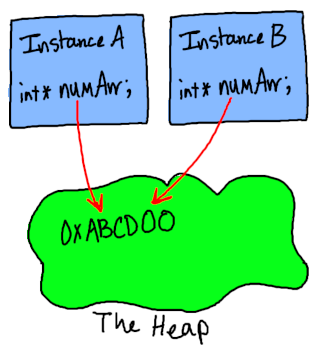
Example of a shallow copy:
With the implicit copy constructor, any pointers in the copied version will be pointing to the same address as in the original. If the class contains a dynamic array, both the copy and the original will end up pointing to the same address of the array in memory.
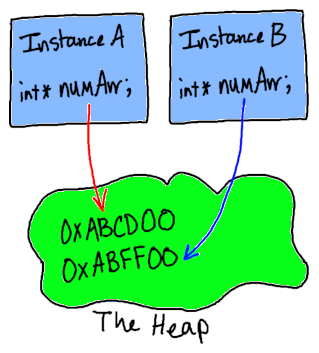
Example of a deep copy:
A new block of memory has been allocated for the int * numArr. The
values from InstanceA’s numArr would be copied to InstanceB’s
numArr via a for loop during construction.
- Example usage - Data
A program might have some sort of data that you might want to make a copy of to do work on but not potentially mess up the original data set. This can be good if you want to sort the data or perform operations on the data.
2.4. Additional notes
- If no constructors are declared, a default parameter is generated automatically at compile-time.
- If a parameterized or copy constructor is declared but not a default parameter, then no default constructor will be generated at compile-time.
Review 4. For each of the following object declarations, which type of constructor is getting called?
a.
Product newProduct( "Notebook", 0.99, 20 );○ Default / ○ Parameterized / ○ Copy
b.
Recipe recipe;○ Default / ○ Parameterized / ○ Copy
c.
Employee employeeOfTheMonth( employeeBob );○ Default / ○ Parameterized / ○ Copy